1. Introdución
Thank you for choosing the Thomson 24-inch HD LED Smart TV, model 24HT2S15. This manual provides essential information to help you set up, operate, and maintain your new television. Please read it thoroughly before use and retain it for future reference.

Imaxe: Fronte view of the Thomson 24-inch HD LED Smart TV, showcasing its frameless design and key features like HD resolution and Dolby Audio.
Características principais:
- TiVo OS with Voice Control: Intuitive interface combining live TV and streaming apps, personalized recommendations, and voice commands.
- Pantalla sen fíos: Mirror your smartphone, tablet, or laptop screen to the TV.
- Audio Dolby: Enhanced sound experience with improved dialogue, detail, and surround effects.
- HDR10: Sharper contrast and realistic colors for an immersive viewexperiencia ing.
- Control remoto retroiluminado: Easy navigation in low light with direct access buttons for popular streaming services.
- Adjustable Side Feet: Flexible positioning options for the TV.
- Sintonizador triplo: Integrated tuners for cable, satellite, and antenna reception.
2. Que hai na caixa
Ao desembalar, asegúrese de que estean presentes todos os seguintes elementos:
- Thomson 24-inch HD LED Smart TV (Model 24HT2S15)
- Control remoto
- Adaptador de alimentación
- Manual de usuario
- Tarxeta de garantía
- Adjustable Side Feet (2x)
If any items are missing or damaged, please contact your retailer or Thomson customer support.
3. Configuración
3.1 Desembalaxe e colocación
Carefully remove the TV from its packaging. It is recommended to have two people for this process. Place the TV on a stable, flat surface or mount it on a wall using a compatible VESA mount (not included).
Asegúrese de que haxa unha ventilación axeitada arredor do televisor. Non bloquee as aberturas de ventilación.
3.2 Colocación do soporte
If you are not wall-mounting the TV, attach the included side feet:
- Coloque o televisor boca abaixo sobre un pano suave e limpo para evitar danar a pantalla.
- Aliñe cada soporte cos orificios para parafusos correspondentes na parte inferior do televisor.
- Secure the stands using the provided screws. The feet are adjustable from 30 cm to 60 cm distance.

Image: The Thomson 24-inch Smart TV showing its dimensions, including a screen diagonal of 60 cm (24 inches), width of 53 cm, and height of 37 cm with the stand. The adjustable stand feet are also illustrated.
3.3 Conexión de periféricos
Connect your external devices to the TV's ports. Refer to the diagram below for port locations.

Imaxe: Unha detallada view of the rear connection panel of the Thomson 24-inch Smart TV, illustrating various ports including 2x USB 2.0, Antenna input, Satellite input, 3x HDMI 1.4 (one with ARC), Service port, Headphone jack, AV IN, Digital Optical Audio Out, and LAN port.
- Potencia: Connect the power adapter to the TV and then to a wall outlet.
- Antena/Satélite: Connect your antenna or satellite cable to the respective input.
- HDMI: Use HDMI cables to connect devices like Blu-ray players, game consoles, or set-top boxes. HDMI 1.4/ARC supports Audio Return Channel.
- USB: Insira unidades USB para reproducir contido multimedia ou actualizar software.
- LAN: Conecta un cable Ethernet para unha conexión a internet por cable.
- AV IN: Para dispositivos máis antigos que usan vídeo composto e audio estéreo.
- Auriculares: Conecta os auriculares para escoitar en privado.
- Saída de audio óptica dixital: Conectar a un sistema de son externo para audio dixital.
3.4 Acendido inicial e primeira configuración
- Conecta o televisor a unha toma de corrente.
- Prema o botón de acendido/apagado do mando a distancia ou do televisor.
- Follow the on-screen instructions to select your language, country, and perform channel scanning for your triple tuner (cable/satellite/antenna).
- Conéctate á túa rede Wi-Fi seleccionándoa da lista e introducindo o contrasinal.
- Complete the TiVo OS setup, including signing in or creating an account.
4. Funcionamento da súa TV
4.1 Funcións de control remoto
The backlit remote control provides easy access to all TV functions, even in dim lighting. It includes dedicated buttons for popular streaming services.

Image: The Thomson Smart TV remote control, highlighting its backlit buttons, voice control microphone, and direct access buttons for Netflix, YouTube, Prime Video, Disney+, and Canal+.
- Botón de encendido: Acende/apaga o televisor.
- Botóns numéricos: Seleccionar canles directamente.
- Panel de navegación (Arriba/Abaixo/Esquerda/Dereita/Aceptar): Navegar polos menús e seleccionar opcións.
- Atrás/Saír: Volver á pantalla anterior ou saír dun menú.
- Subir/Baixar o volume: Axuste o nivel de volume.
- Canle arriba/abajo: Cambiar de canle de televisión.
- Silenciar: Silenciar ou activar o son.
- Casa: Access the TiVo OS home screen.
- Botón de control de voz: Activate voice commands (microphone icon).
- Botóns de acceso directo: Launch Netflix, YouTube, Prime Video, Disney+, Canal+ instantly.
4.2 TiVo OS e funcións intelixentes
The TiVo OS provides a unified platform for live TV and streaming content. Explore personalized recommendations and access your favorite apps.

Image: The Thomson Smart TV screen showing various streaming application icons like Netflix, YouTube, Disney+, Prime Video, Plex, DAZN, Canal+, and Pluto TV, indicating integrated smart TV capabilities.
- Acceso á aplicación: Navigate to the home screen to find and launch pre-installed apps or download new ones from the app store.
- Control de voz: Press the voice control button on your remote and speak commands to search for content, launch apps, or control TV functions.
- Pantalla sen fíos: Use the Wireless Display feature to mirror content from your compatible smartphone, tablet, or laptop directly to your TV screen.

Image: An illustration demonstrating the voice control feature of the Thomson Smart TV, showing a remote control with a microphone icon and examples of voice commands like "Open Netflix" or "Play movies with Tom Hanks."

Image: The Thomson Smart TV displaying content mirrored from a smartphone, illustrating the Wireless Display and Google Cast features for seamless content sharing.
4.3 Melloras de imaxe e son
- HDR10: Experience improved contrast, brightness, and color accuracy with HDR10 content. This technology enhances both bright and dark scenes for a more dynamic picture.
- Audio Dolby: Enjoy rich, clear, and powerful sound. Dolby Audio optimizes dialogue, enhances detail, and provides an immersive surround sound experience.

Image: A side-by-side comparison of picture quality, demonstrating the enhanced contrast and color vibrancy of HDR10 on the right compared to standard SDR on the left, with a building and landscape scene.

Image: An illustration depicting sound waves emanating from a TV screen, with the Dolby Audio logo prominently displayed, signifying enhanced audio quality for an immersive viewexperiencia ing.
5. Mantemento
5.1 Limpeza do televisor
- Pantalla: Limpe a pantalla con suavidade cun pano suave e sen pelusa. Para marcas difíciles, d lixeiramenteampEnxágüe o pano con auga ou cun limpador de pantallas especializado. Nunca pulverice líquido directamente sobre a pantalla.
- Gabinete: Limpe o moble e o soporte do televisor cun pano suave e seco.
- Control remoto: Limpar o mando a distancia cun pano suave e seco.
Atención:
- Desconecte sempre o televisor antes de limpalo.
- Non empregue produtos de limpeza abrasivos, ceras nin solventes.
5.2 Actualizacións de software
Your Smart TV may receive software updates to improve performance and add new features. It is recommended to enable automatic updates or check for updates periodically through the TV's settings menu to ensure optimal functionality and security.
6 Solución de problemas
Se tes problemas co teu televisor, consulta os seguintes problemas e solucións comúns:
| Problema | Causa posible | Solución |
|---|---|---|
| Sen poder | Cable de alimentación desconectado; problema coa toma de corrente | Asegúrate de que o cable de alimentación estea conectado correctamente. Proba a toma de corrente con outro dispositivo. |
| Sen imaxe, pero hai son | Fonte de entrada incorrecta; cable defectuoso | Check the input source (e.g., HDMI 1, Antenna). Ensure cables are connected correctly. |
| Sen son, pero si imaxe | Volume silenciado ou demasiado baixo; problema co sistema de son externo | Unmute the TV or increase volume. Check audio settings and external audio connections. |
| O control remoto non funciona | Pilas gastadas; obstrución; mando a distancia non emparellado | Replace batteries. Remove any obstructions. Re-pair the remote if necessary (refer to TV settings). |
| Non se pode conectar á wifi | Contrasinal incorrecto; problema co enrutador; televisor demasiado lonxe do enrutador | Verify Wi-Fi password. Restart your router. Move TV closer or use a wired LAN connection. |
| Smart features not responding | Network issue; temporary software glitch | Check internet connection. Restart the TV by unplugging it for a minute and plugging it back in. |
If the problem persists after trying these solutions, please contact Thomson customer support.
7. Especificacións
Detailed technical specifications for the Thomson 24HT2S15 Smart TV:
| Característica | Detalle |
|---|---|
| Marca | Thomson |
| Número de modelo | 24HT2S15 |
| Tamaño da pantalla | 24 polgadas (60 cm) |
| Tecnoloxía de visualización | LED |
| Resolución | 768p (1366 x 768 píxeles) |
| Taxa de actualización | 60 Hz |
| Relación de aspecto | 16:9 |
| Tecnoloxía de conectividade | Ethernet, HDMI, USB, Wi-Fi |
| Características especiais | Parental Controls, TiVo OS, Voice Control, HDR10, Dolby Audio |
| Dimensións do produto (con soporte) | 8P x 53L x 37H cm (aprox. 8 x 53 x 37 cm) |
| Peso | 3.33 kg |
| Compoñentes incluídos | Power Adapter, User Manual, Warranty Card, Remote Control |
| Idiomas admitidos | Francés, inglés, italiano, español, alemán |
| Clase de eficiencia enerxética | E |
| Información do produto EPREL | https://eprel.ec.europa.eu/qr/1969520 |
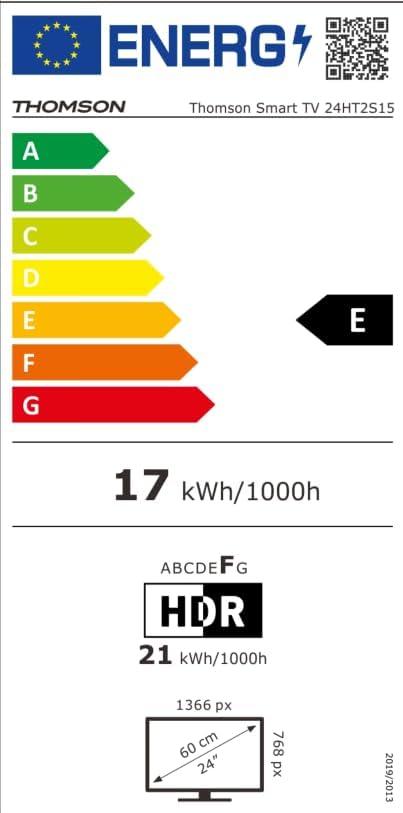
Image: The EU Energy Label for the Thomson Smart TV 24HT2S15, showing an energy efficiency class of E and energy consumption of 17 kWh/1000h for SDR and 21 kWh/1000h for HDR.
8. Garantía e soporte
8.1 Información da garantía
Thomson products are covered by a 3-year warranty. For detailed information regarding warranty claims, returns, or defective products, please refer to the warranty card included in your package or visit the Thomson support websitio.
For specific information on purchases made via Amazon, consult Amazon's help pages regarding returns and defective products.
8.2 Atención ao cliente
If you require further assistance or have questions not covered in this manual, please contact Thomson customer support:
- Fabricante: Fluxoview GmbH
- Correo electrónico: contacto@fluxoview.com
- Websitio: www.streamview.com
- Teléfono: +4318900066
Please have your model number (24HT2S15) and purchase details ready when contacting support.