1. Introdución
The LAUNCH X431 PRO3S+ Elite is an advanced, all-in-one bidirectional scan tool designed for comprehensive vehicle diagnostics and maintenance. Featuring the SmartLinkC V2.0 communication interface, it supports a wide range of protocols including J2534, CANFD, DoIP, D-PDU, and FCA. This device offers OE-level full system diagnostics, intelligent topology mapping, over 60 service functions, and extensive vehicle coverage, making it an essential tool for professional mechanics and serious DIY enthusiasts.

Figure 1.1: LAUNCH X431 PRO3S+ Elite highlighting key features like Topology Mapping, J2534 Protocols, and 3000+ Active Tests.
2. Configuración e configuración inicial
2.1 Contido do paquete
Before starting, verify all items are present in the package:
- X431 PRO3S+ ELITE Display Tablet
- SmartLink C V2.0 Communication Interface
- Maletín de transporte
- Conector HD15F a OBDII 16
- Cable DB15F a HD15F
- UK/EU/US Power Plugs
- Cable de rede
- Cable USB tipo A - tipo B
- Cable USB tipo A - tipo C
- Manual de usuario
- PIN Envelope (for software activation)
- Guía de inicio rápido
- Non-16 Pin Adapter Box containing: BENZ-38, BMW-20, HONDA-3, TOYOTA-17, GM/VAZ-12, TOYOTA-22, CHRYSLER-6, KIA-20, BENZ-14, FORD 6+1, NISSAN14+16, MITSUBISHI/HYUNI-12+16 connectors
- Power Cable Clips
- Fusibles
Video 2.1: Unboxing the LAUNCH X431 PRO3S+ ELITE SMARTLINKC and reviewing its contents.
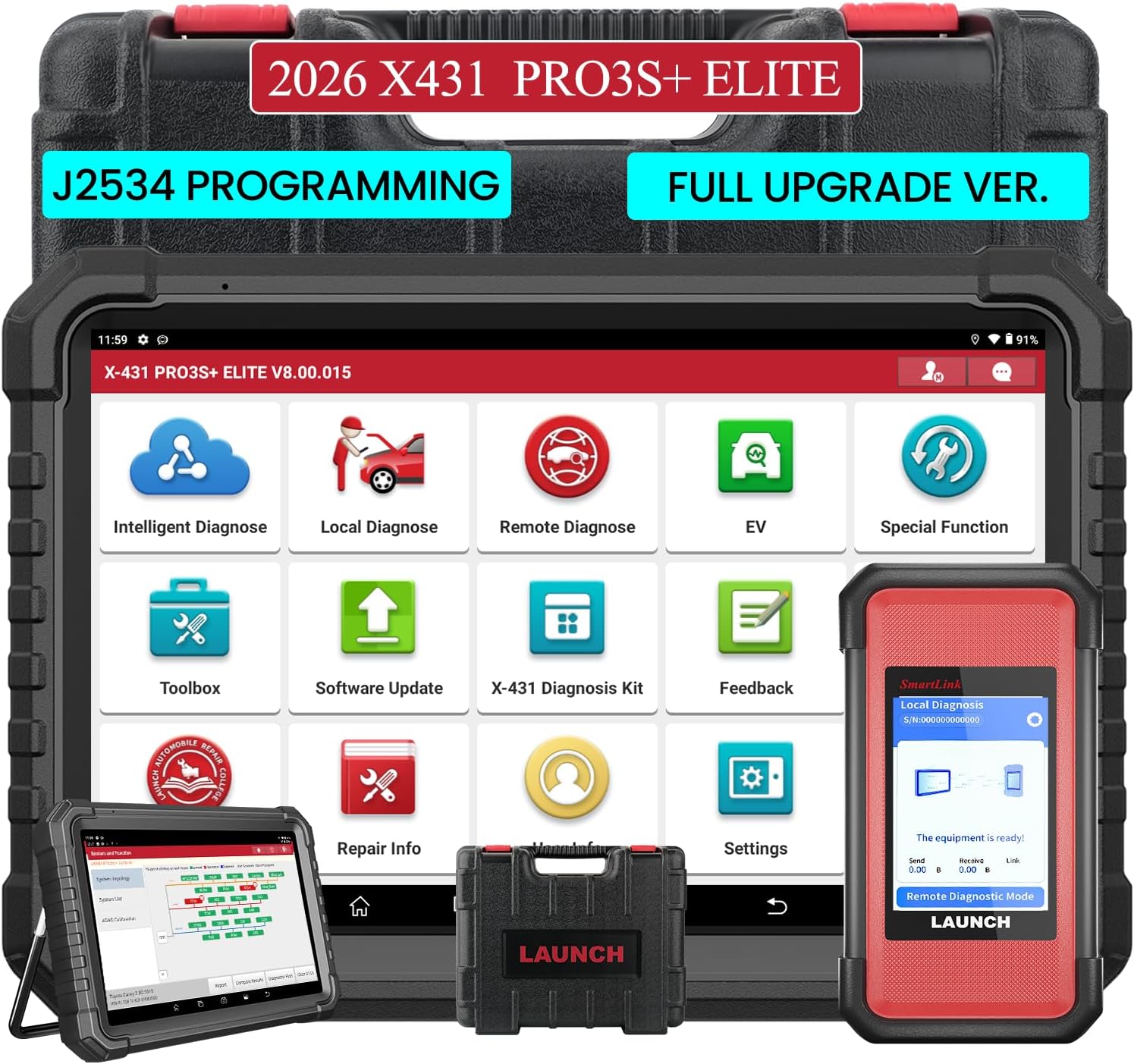
Figure 2.1: The LAUNCH X431 PRO3S+ Elite Display Tablet and the SmartLink C V2.0 communication interface.

Figura 2.2: Traseira view of the tablet showing the kickstand and the SmartLink C V2.0 module.
2.2 Acendido e configuración inicial
- Mantén premido o botón de acendido da tableta para acenderla.
- Follow the on-screen prompts to select your language, time zone, and connect to a Wi-Fi network.
- Register your device using the serial number and activation code found in the PIN envelope.
- Perform a system update to ensure all software and diagnostic applications are up to date.
Video 2.2: A detailed guide on how to use the LAUNCH X431 PRO3S+ ELITE, including initial setup steps.
3. Instrucións de funcionamento
3.1 Conexión ao vehículo
- Locate the vehicle's OBD-II port (usually under the dashboard).
- Connect the SmartLink C V2.0 to the vehicle's OBD-II port using the appropriate connector (OBDII 16-pin or a specific non-16 pin adapter).
- Ensure the SmartLink C V2.0 is powered on (it typically draws power from the vehicle's OBD-II port).
- On the X431 PRO3S+ Elite tablet, select 'Local Diagnose' or 'Intelligent Diagnose' to establish communication with the vehicle.

Figure 3.1: The LAUNCH X431 PRO3S+ Elite supports a wide range of vehicle makes and models, including HD Trucks and New Energy Vehicles.
3.2 Funcións de diagnóstico
The device offers a comprehensive suite of diagnostic capabilities:
- Diagnóstico Intelixente: Automatically identifies vehicle VIN, reads all system fault codes, and provides a health report.
- Mapeo de topoloxía: Visually displays the vehicle's system network, showing the status of each control unit (normal, abnormal, scanned, not equipped) for quick identification of issues.
- Ler e borrar códigos: Access and clear Diagnostic Trouble Codes (DTCs) from all available vehicle systems (Engine, ABS, SRS, Transmission, etc.).
- Fluxo de datos en directo: View real-time data parameters in various formats (text, graph, analog) to monitor vehicle performance and pinpoint intermittent issues.
- Proba activa / Control bidireccional: Send commands to vehicle components to test their functionality (e.g., activate cooling fan, open/close windows, test fuel pump).
- Special Functions (60+): Perform various maintenance and service functions such as Oil Reset, ABS Brake Bleed, EPB Reset, SAS Calibration, BMS Reset, Injector Reset, Throttle Adaptation, and more.
- Codificación da ECU: Match component control modules, customize OE settings, perform adaptive data setting, and activate advanced functions.
- J2534 Programming: Utilize the SmartLinkC V2.0 as a J2534 PassThru device for OEM diagnostic software to perform ECU programming and reprogramming.
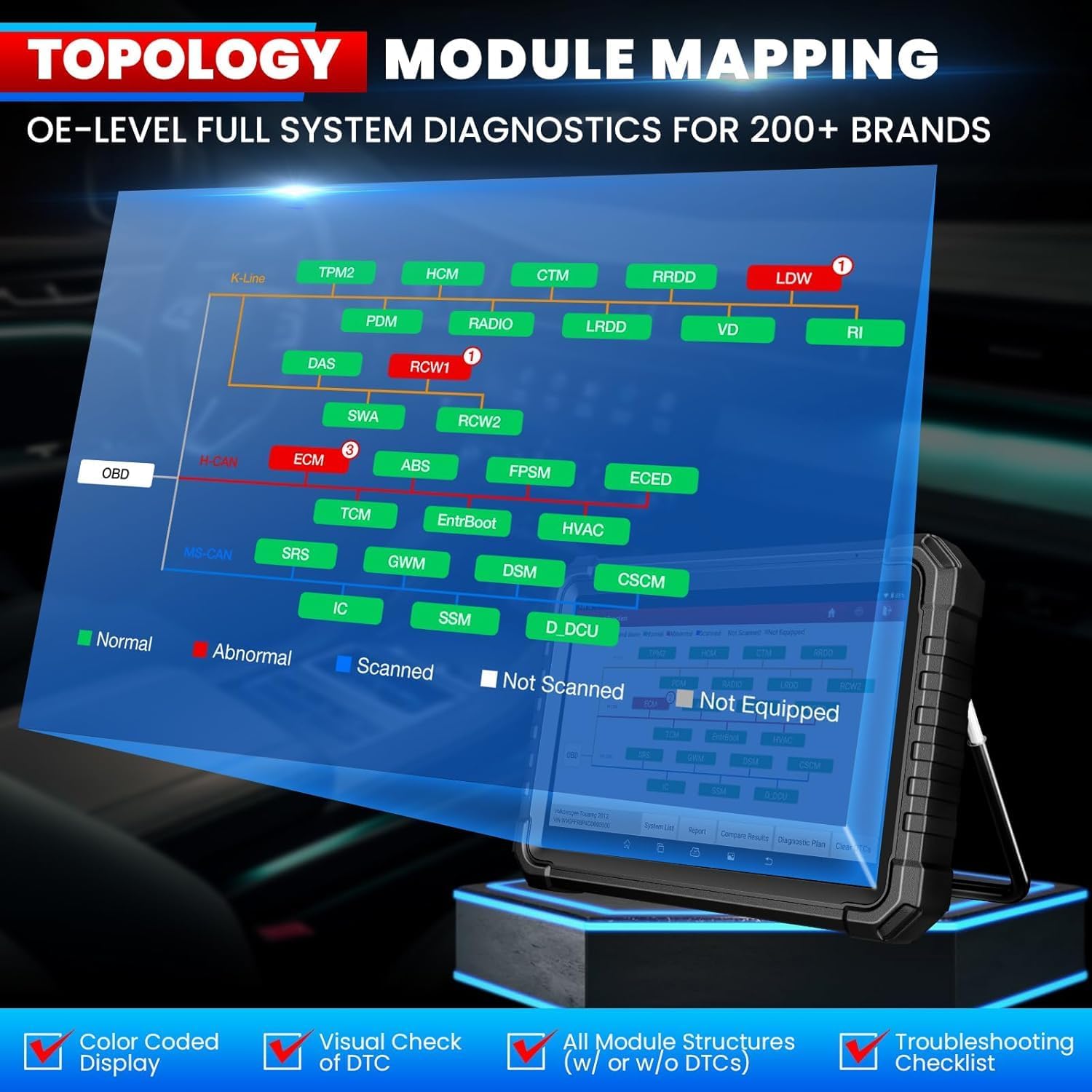
Figure 3.2: Intelligent Topology Mapping provides a visual overview of vehicle systems and their status.

Figure 3.3: Demonstrates Bi-Directional Control (Active Test) capabilities and OE-Level All System Diagnostics.

Figure 3.4: A selection of over 60 hot service functions, including Oil Reset, ABS Bleeding, and EPB Reset.
3.3 Remote Diagnosis
The SmartLink C V2.0 supports remote diagnosis, allowing you to connect with other professionals or receive remote assistance for complex issues.
4. Mantemento
4.1 Actualizacións de software
Your LAUNCH X431 PRO3S+ Elite includes 2 years of free software updates. Regularly check for and install updates to ensure optimal performance and access to the latest vehicle models and functions. Connect the tablet to a stable Wi-Fi network and navigate to the 'Software Update' section in the main menu.
Video 4.1: This video confirms the authenticity of LAUNCH products and highlights the importance of software updates.
4.2 Coidado do dispositivo
- Keep the tablet and SmartLink C V2.0 clean and free from dust and debris.
- Garde o dispositivo na súa funda de transporte cando non o use para evitar danos.
- Evite expoñer o dispositivo a temperaturas extremas ou á luz solar directa durante períodos prolongados.
- Charge the tablet regularly to maintain battery health.
5 Solución de problemas
- O dispositivo non se acende: Ensure the battery is charged or connect the device to a power source.
- Erro de comunicación co vehículo: Verify the SmartLink C V2.0 is securely connected to the OBD-II port and the correct adapter is used. Check vehicle ignition status.
- Problemas de actualización de software: Ensure a stable Wi-Fi connection. If registration issues occur, contact customer service for assistance.
- Product already registered: If prompted that the product has already been registered during initial setup, contact customer service for a replacement service or to clear the registered information.
6. Especificacións
| Característica | Especificación |
|---|---|
| Marca | LANZAMIENTO |
| Modelo | X-431 PRO3(PRO3S + ELITE) / LAUNCH PRO3S+ ELITE SMARTLINKC |
| Sistema Operativo | Android 10.0 |
| CPU | Procesador de 4 núcleos, 2.0 GHz |
| Conectividade | Wi-Fi de 2.4 GHz/5 GHz |
| Capacidade da batería | 6300 mAh/7.6 V |
| Tamaño da pantalla | 10.1 Inches Touchscreen |
| Cámara | 8 MP |
| Memoria de almacenamento | 4 GB de RAM + 64 GB de ROM |
| Protocolos admitidos | J2534, CANFD/DoIP/D-PDU/FCA |
| Idiomas admitidos | 25+ Software Languages (e.g., EN, DE, FR, SP, JP) |
| Dimensións do produto | 7 cm de longo x 17.3 cm de ancho x 14 cm de alto |
| Peso do elemento | 15 libras |
| Tipo de ajuste automotriz | Ajuste universal |
7. Garantía e soporte
The LAUNCH X431 PRO3S+ Elite comes with a commitment to customer satisfaction:
- Actualizacións de software: Enjoy 2 years of free software updates to keep your device current with the latest vehicle models and diagnostic functions.
- Política de devolución: Hai dispoñible unha política de devolución e substitución de 90 días.
- Atención ao cliente: LAUNCH provides 100% customer service and online support (7/24/365).
For any questions or assistance, please refer to the contact information provided in the product documentation or on the official LAUNCH websitio.


