1. Produto rematadoview
The AEOCKY Air Purifier is designed to improve indoor air quality through advanced filtration technology. It features a bionic turbo-jet design for efficient air circulation and a multi-effect filter system for comprehensive air purification.

Imaxe 1.1: Fronte view of the AEOCKY Air Purifier unit.
Características principais:
- Bionic Turbo-Jet Design: Incorporates 16 CFD-Optimized Blades, an Integrated Airflow Chamber, and a 2-GEN DC VFD Motor to enhance airflow circulation and reduce wind resistance.
- YearChange Filter Technology: Engineered for extended filter longevity, designed to last significantly longer than conventional filters. Includes two pet-specific washable pre-filters.
- All-in-One Multi-Effect Filter: A 5-layer filtration system effectively removes dust, dander, pollen, smoke, VOCs, odors, and fine particles.
- Eficiencia enerxética: Consumes approximately 0.15 kWh per day at its highest setting.
- Authoritative Certifications: Tested and certified by SGS, CARB, ETL, DOE, and FCC, ensuring zero ozone emission.
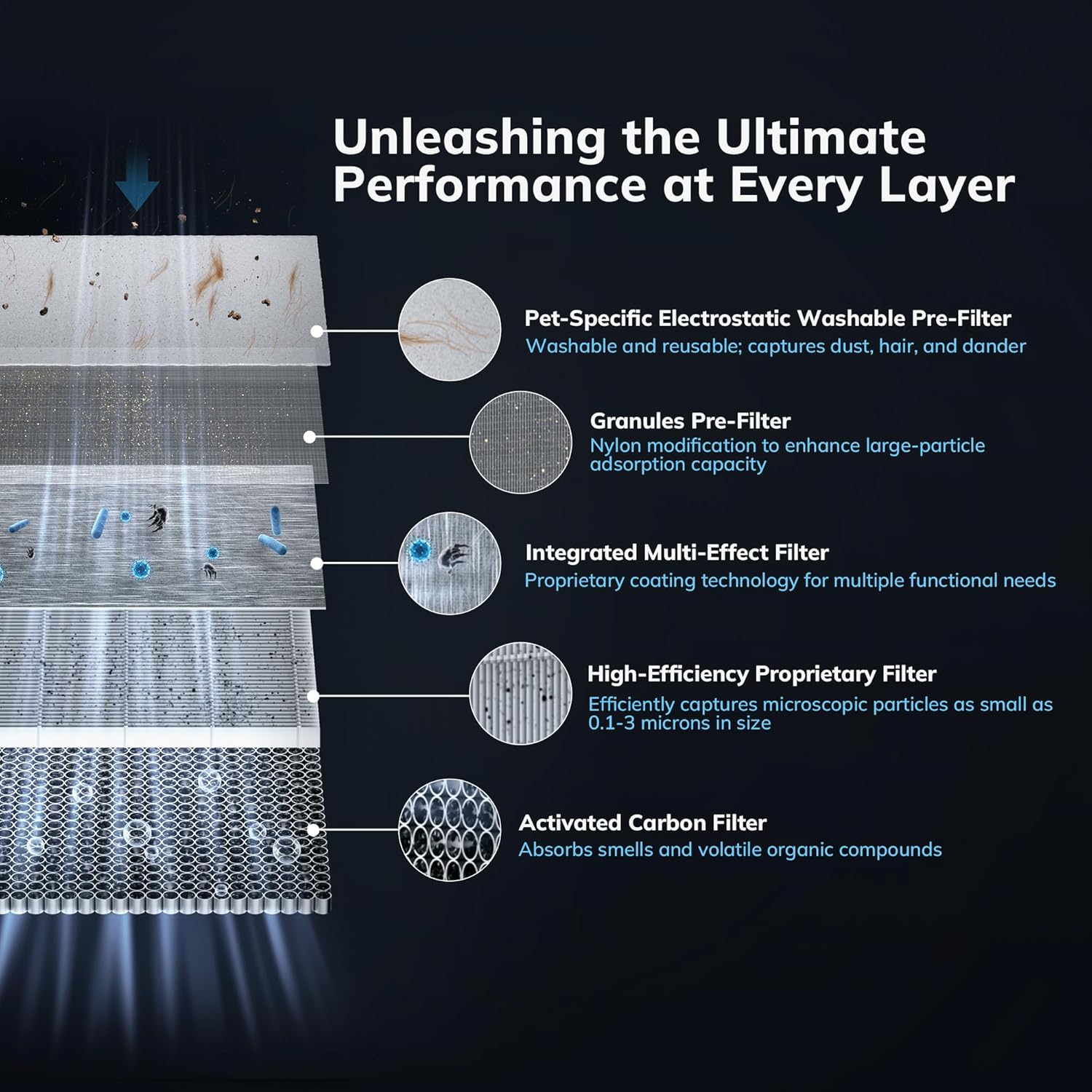
Image 1.2: Diagram illustrating the five distinct layers of the multi-effect filter system, including the Pet-Specific Electrostatic Washable Pre-Filter, Granules Pre-Filter, Integrated Multi-Effect Filter, High-Efficiency Proprietary Filter, and Activated Carbon Filter.
2. Instrucións de seguridade
Please read all safety instructions carefully before using the air purifier to prevent injury or damage.
- Always unplug the air purifier before cleaning, performing maintenance, or when not in use for extended periods.
- Non fagas funcionar o aparello cun cable ou enchufe danados. Ponte en contacto co servizo de atención ao cliente para obter axuda.
- Keep the air purifier away from water or moist environments. Do not immerse the unit in water or other liquids.
- Ensure that air inlets and outlets are not blocked. Maintain adequate clearance around the unit for proper airflow.
- Non introduza os dedos nin obxectos estraños en ningunha das aberturas.
- Este aparello non está pensado para o seu uso por persoas (incluídos nenos) con capacidades físicas, sensoriais ou mentais reducidas, ou con falta de experiencia e coñecementos, a menos que teñan supervisión ou instrucións sobre o uso do aparello por unha persoa responsable da súa seguridade. .
- Use only AEOCKY genuine replacement filters.
3. Contido do paquete
Verifica que todos os elementos estean presentes no paquete:
- AEOCKY Air Purifier Unit
- One (1) Multi-Effect Filter (pre-installed)
- One (1) Extra Multi-Effect Filter
- Manual de usuario (este documento)
4. Configuración e instalación
4.1 Desembalaxe
- Retire con coidado o purificador de aire da súa embalaxe.
- Retire todas as bolsas de plástico e os materiais de protección.
4.2 Instalación do filtro
The air purifier comes with one filter pre-installed and one extra filter. Ensure the pre-installed filter is correctly seated before first use.
- Xire o purificador de aire boca abaixo.
- Xire a tapa da base en sentido antihorario para desbloqueala e retirala.
- Remove the pre-installed filter from its protective plastic bag.
- Insert the filter into the unit, ensuring it is seated correctly.
- Volva colocar a tapa da base e xire no sentido das agullas do reloxo para bloqueala de forma segura.

Image 4.1: The AEOCKY YearChange Series Filter and its packaging, demonstrating the filter's design.
4.3 Colocación
- Coloque o purificador de aire sobre unha superficie firme e plana.
- Ensure there is at least 6 inches (15 cm) of clearance on all sides for optimal airflow.
- Avoid placing the unit near heat sources, direct sunlight, or in areas with excessive moisture.
4.4 Conexión de alimentación
Conecte o cable de alimentación a unha toma de corrente estándar. A unidade xa está lista para funcionar.
5. Instrucións de funcionamento
5.1 Encendido/apagado
Press the power button on the control panel to turn the air purifier on or off.
5.2 Control de velocidade do ventilador
Cycle through available fan speeds (e.g., Low, Medium, High, Turbo) by pressing the fan speed button. Select the desired speed based on your air purification needs.
5.3 Selección de modo
If available, press the mode button to switch between different operating modes such as Sleep Mode (for quiet operation) or Auto Mode (adjusts fan speed based on air quality).
5.4 Filter Reset Indicator
The air purifier is equipped with a filter life indicator. When the indicator light illuminates, it signifies that the filter needs to be checked or replaced. After replacing the filter, press and hold the filter reset button (if available) for 3-5 seconds to reset the filter life counter.
6. Mantemento
Regular maintenance ensures optimal performance and extends the lifespan of your AEOCKY Air Purifier.
6.1 Substitución do filtro
The AEOCKY YearChange filter technology is designed for extended use, lasting significantly longer than conventional filters. Replace the filter when the filter indicator light illuminates or when you notice a decrease in performance or an increase in odors.
- Desenchufe o purificador de aire da toma de corrente.
- Dé a volta á unidade e desbloquee a tapa da base xirándoa en sentido antihorario.
- Retire o filtro antigo e desfágase del correctamente.
- Unpack a new AEOCKY genuine replacement filter.
- Insira o novo filtro na unidade, asegurándose de que estea correctamente asentado.
- Volva colocar a tapa da base e xire no sentido das agullas do reloxo para bloqueala de forma segura.
- Plug in the air purifier and reset the filter life indicator as described in Section 5.4.
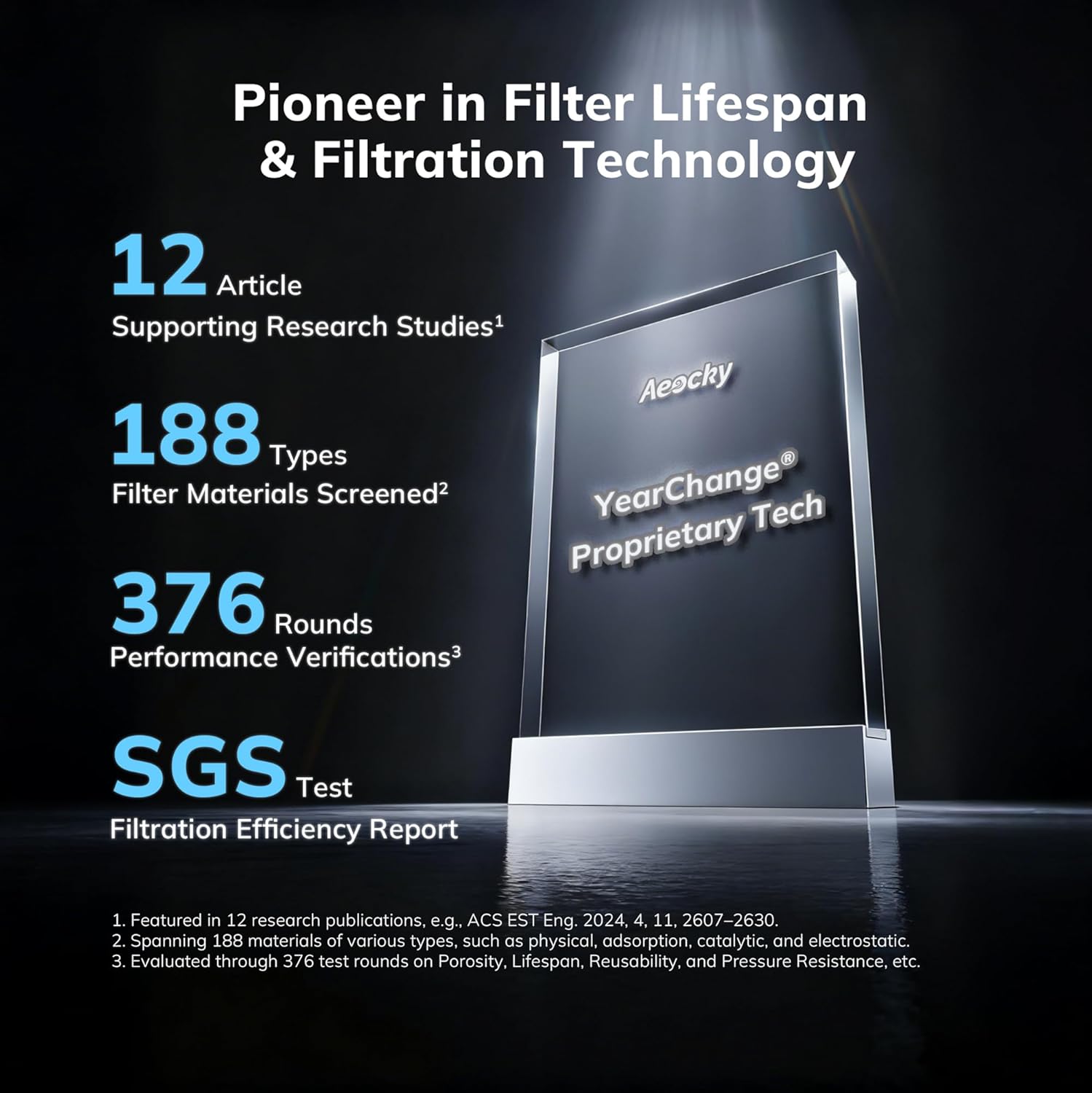
Image 6.1: An illustration highlighting AEOCKY's commitment to filter lifespan and filtration technology, showing research studies, material screening, performance verifications, and SGS test results.
6.2 Limpeza do prefiltro lavable
The air purifier includes pet-specific washable pre-filters designed to capture large particles like hair and dander. Regular cleaning of these pre-filters helps prolong the life of the main filter.
- Desenchufe o purificador de aire.
- Remove the pre-filter layer (refer to filter replacement steps for access).
- Gently rinse the pre-filter under running water.
- Allow the pre-filter to air dry completely before re-installing it. Do not use heat to dry.
6.3 Limpeza exterior
Limpe a superficie exterior do purificador de aire cun pano suave e seco. Non empregue produtos de limpeza abrasivos nin solventes.
7 Solución de problemas
Consulta esta sección para ver os problemas comúns e as súas solucións.
| Problema | Causa posible | Solución |
|---|---|---|
| A unidade non se acende | No power supply; Power cord not securely plugged in | Check power outlet; Ensure power cord is firmly connected. |
| Fluxo de aire reducido | Filter is dirty or clogged; Air inlets/outlets blocked | Clean or replace filter; Ensure no obstructions around the unit. |
| Ruído insólito | Filter not installed correctly; Foreign object inside unit | Reinstall filter; Unplug and check for foreign objects (if safe to do so). |
| A luz indicadora do filtro permanece acesa despois da substitución | Filter life counter not reset | Press and hold the filter reset button for 3-5 seconds. |
Se o problema persiste despois de intentar estas solucións, póñase en contacto co servizo de atención ao cliente.
8. Especificacións
- Modelo: B0G2SS3VLJ
- Marca: AEOCKY
- Tipo de filtro: 5-layer Multi-Effect Filter with YearChange Technology and Washable Pre-Filter
- Consumo de enerxía: Approximately 0.15 kWh per day (at highest setting)
- Ozone Emission: Cero
- Certificacións: SGS, CARB, ETL, DOE, FCC
- Primeira data dispoñible: 21 de outubro de 2025

Image 8.1: Display of various authoritative certifications including California Air Resources Board Certificate, Electrical Testing Laboratories Certificate, Federal Communications Commission Certificate, and SGS verification, confirming the product's adherence to international standards.
9. Garantía e soporte
9.1 Información da garantía
Specific warranty details for your AEOCKY Air Purifier are typically provided with the product packaging or available on the official AEOCKY websitio. Garde o comprobante de compra para reclamacións de garantía.
9.2 Atención ao cliente
For technical assistance, troubleshooting beyond this manual, or warranty inquiries, please contact AEOCKY customer support through their official websitio web ou o vendedor onde se comprou o produto.


