1. Introdución
This manual provides essential information for the safe and efficient use of your DOOGEE Note56 Android 16 smartphone. Please read it thoroughly before using your device.

Imaxe: Anverso e reverso view of the DOOGEE Note56 smartphone, showcasing its design and key specifications like 6150mAh battery, Android 16, 6.56-inch display, and 90Hz refresh rate.
2. Configuración
2.1. Contido do paquete
Verifique que o seu paquete conteña os seguintes elementos:
- DOOGEE Note56 Smartphone
- Adaptador de alimentación
- Cable USB
- Ferramenta de expulsión de SIM
- Funda protectora
- Guía de inicio rápido (este manual)
2.2. Instalación da tarxeta SIM e da tarxeta TF
The DOOGEE Note56 supports dual SIM cards and a TF (microSD) card for expandable storage.
- Localiza a bandexa da tarxeta SIM no lateral do dispositivo.
- Insira a ferramenta de expulsión da tarxeta SIM no pequeno orificio que hai xunto á bandexa e prema suavemente ata que esta saia.
- Coloque as tarxetas Nano-SIM e/ou a tarxeta TF nas ranuras designadas da bandexa. Asegúrese de que os contactos dourados estean orientados cara abaixo.
- Volva inserir a bandexa con coidado no teléfono ata que encaixe no seu lugar.
2.3. Acendido inicial e configuración básica
- Mantén premido o botón de acendido/apagado ata que apareza o logotipo de DOOGEE.
- Segue as instrucións na pantalla para seleccionar o idioma, conectarte a unha rede wifi e configurar a túa conta de Google.
- Configure security settings such as screen lock (PIN, pattern, password) and face recognition.
2.4. Cargando o dispositivo
Connect the USB cable to the power adapter and then to the phone's charging port. Plug the adapter into a power outlet. The battery indicator will show charging status. For optimal battery life, use the provided charger.
3. Instrucións de funcionamento
3.1. Sistema operativo Android 16
The DOOGEE Note56 runs on the latest Android 16 system, offering an optimized and intuitive user experience. It features improved application launch speeds, enhanced responsiveness, and a refined user interface. A new Privacy Space function allows for hiding sensitive data and applications, ensuring secure usage.

Imaxe: Máis deview of the Android 16 operating system interface, displaying various applications, settings menus, and system information.
3.2. Características da pantalla
The device is equipped with a 6.56-inch IPS waterdrop display, providing a smooth visual experience with a 90Hz high refresh rate. The 720x1612 HD+ resolution and 90% screen-to-body ratio enhance viewing of movies and videos. Two eye-friendly modes are included to reduce eye strain during prolonged use.

Imaxe: Primeiro plano view of the DOOGEE Note56's 6.56-inch IPS display, illustrating its vibrant colors and the smooth 90Hz refresh rate.
3.3. Funcións da cámara
Capture vivid and beautiful photos with the 8MP main camera and take clear selfies with the 5MP front camera. The device utilizes AI functions for enhanced photography, including:
- AI Scene Recognition: Automatically detects and optimizes settings for 12 different scenes.
- Modo nocturno: Mellora a calidade das fotos en condicións de pouca luz.
- Modo retrato: Creates professional-looking photos with blurred backgrounds.
- HDR: Enhances dynamic range for balanced exposure.
- Modo profesional: Offers manual control over camera settings.
- Captura de sorrisos: Saca unha foto automaticamente cando detecta un sorriso.
- panorama: Captures wide-angle scenic shots.
- Disparo continuo: Fai varias fotos en rápida sucesión.
- Fun Filters: Apply various creative effects to your photos.

Image: Diagram illustrating the 8MP rear camera and 5MP front camera specifications, along with icons representing various AI scene recognition modes.

Image: The camera interface of the DOOGEE Note56, highlighting features like HDR, Pro Mode, Smile Capture, Panorama, Continuous Shooting, Night Mode, and Fun Filters, with a sampa foto.

Image: The 5MP front camera's capabilities for selfies, demonstrating Beauty Mode and Portrait Effect for bright, natural, and shareable self-portraits.
3.4. Memoria e almacenamento
The DOOGEE Note56 is equipped with 24GB RAM (3GB physical RAM + 21GB extended RAM) and 64GB of internal storage (ROM). It supports TF card expansion up to 2TB, providing ample space for photos, videos, and applications. This powerful memory configuration ensures smooth multitasking and minimizes lag during gaming or heavy app usage.

Imaxe: Unha interna view diagram highlighting the 64GB ROM and 24GB RAM (composed of 3GB physical and 21GB extended RAM) for seamless performance.
3.5. Conectividade e navegación
The device supports Bluetooth 4.2 for stable wireless connections and 4G Dual SIM for broad network compatibility both domestically and internationally. For navigation, it integrates three major positioning systems: GPS, GLONASS, and Galileo, ensuring accurate location services from urban areas to remote locations.
3.6. Outras funcións intelixentes
- Instant Face Recognition: Unlock your device quickly and securely using your face.
- Radio FM: Enjoy local radio stations without an internet connection.
- Conector para auriculares de 3.5 mm: Connect your wired headphones for audio playback and calls.
- Smart Body Sensor: (Specific functionality not detailed, refers to general smart sensor capabilities).
- Modo de sistema dual: Allows for separate user environments.
- Superportapapeis: Enhanced clipboard functionality.
- Screen Optimization & Color Customization: Adjust display settings for personal preference.

Image: Visual representation of instant face recognition, accurate GPS navigation, and the FM radio interface on the DOOGEE Note56.

Imaxe: Unha exposición de colaxeasing various smart OS features of the DOOGEE Note56, including smart body sensor, dual system mode, super clipboard, RAM expansion, screen optimization, and screen color customization.
4. Mantemento
4.1. Xestión da batería
The DOOGEE Note56 features a 6150mAh large capacity battery, designed for extended use. It supports approximately 1000 charge/discharge cycles and offers up to 4 years of durable battery life. The device also supports 5W reverse charging, allowing it to act as a power bank for other devices.
- Para maximizar a duración da batería, evite temperaturas extremas.
- Non descargues completamente a batería con regularidade.
- Use the original charger for optimal charging performance.
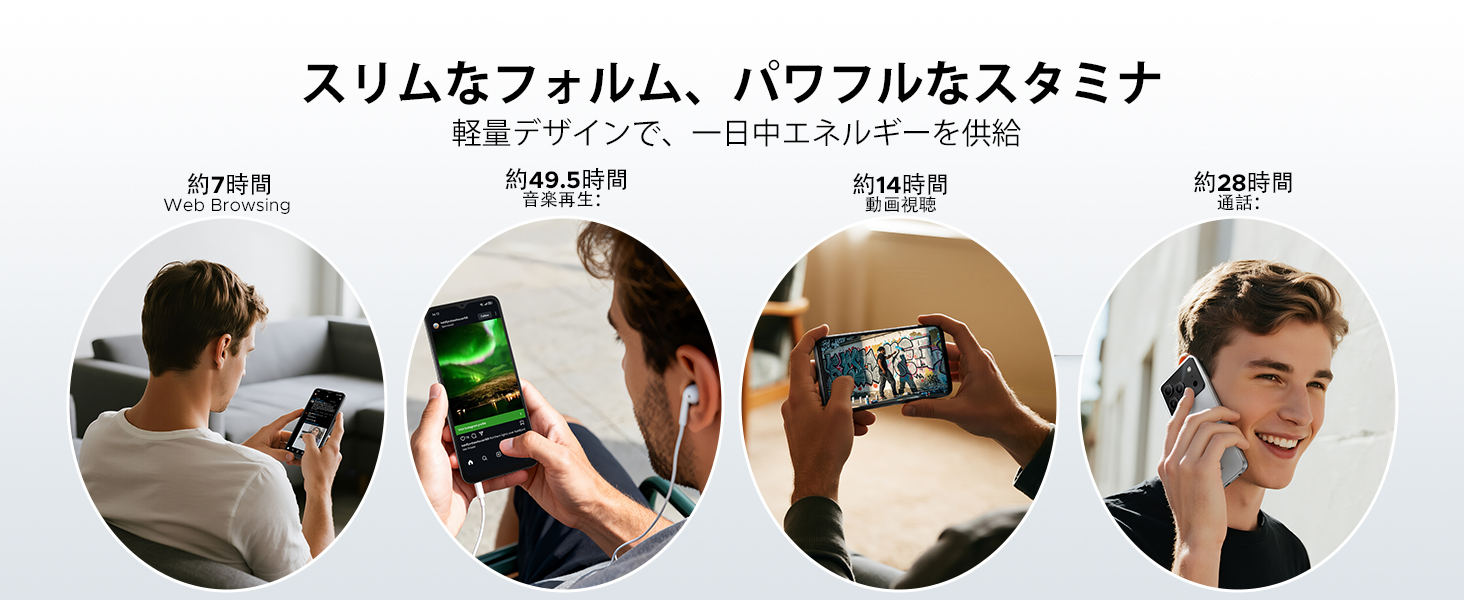
Image: Diagram illustrating the 6150mAh silicon-carbon battery, highlighting its features such as 1000 charge cycles, 4 years of durability, 20% smaller size, and 5W reverse charging capability.

Image: Infographic showing estimated battery life for different activities on the DOOGEE Note56: approximately 7 hours for web browsing, 49.5 hours for music playback, 14 hours for video watching, and 28 hours for calls.
4.2. Limpeza e coidado
- Use un pano suave e sen pelusa para limpar a pantalla e o corpo do dispositivo.
- Evite o uso de produtos químicos agresivos ou materiais abrasivos.
- Manteña o dispositivo lonxe do exceso de po e humidade.
4.3. Actualizacións de software
Comproba e instala actualizacións de software con regularidade para asegurarte de que o teu dispositivo teña as funcións, os parches de seguranza e as melloras de rendemento máis recentes. Normalmente podes atopar esta opción na configuración do dispositivo, en "Sistema" ou "Acerca do teléfono".
5 Solución de problemas
If you encounter issues with your DOOGEE Note56, refer to the following common troubleshooting steps:
- O dispositivo non se acende: Asegúrate de que a batería estea cargada. Mantén premido o botón de acendido/apagado durante polo menos 10-15 segundos para forzar un reinicio.
- As aplicacións fallan ou conxélanse: Close and reopen the app. Clear the app's cache and data in Settings > Apps. If the issue persists, uninstall and reinstall the app.
- Problemas de conectividade de rede: Check if Airplane Mode is off. Restart the device. Verify your SIM card is correctly inserted and your mobile data plan is active. For Wi-Fi, try forgetting the network and reconnecting.
- Problemas de carga: Ensure the charging cable and adapter are securely connected and undamaged. Try a different outlet or charger. Clean the charging port gently.
- Rendemento lento: Pecha as aplicacións en segundo plano innecesarias. Borra a caché con regularidade. Considera liberar espazo de almacenamento.
For more complex issues, please refer to the support section.
6. Especificacións
| Característica | Especificación |
|---|---|
| Tamaño da pantalla | 6.56 polgadas |
| Capacidade da batería | 6150 mAh |
| Cor | Negro (outras variantes dispoñibles) |
| Nome da marca | DOOGEE |
| Fabricante | DOOGEE |
| Ano de lanzamento | 2025 |
| Compoñentes incluídos | Adaptador de alimentación |
| OS compatible | Android 16 |
| Outras características | SIM-free |
| Nome do modelo | NOTA 56 |
| Tipo de visualización | IPS |
| Dimensións do paquete | 19.3 x 10.5 x 5.1 cm; 410 g |
| Referencia do fabricante | NOTA 56 |
| Tamaño da RAM instalada | 24 GB |
| Capacidade de almacenamento da memoria | 64 GB |
7. Garantía e soporte
7.1. Información da garantía
The DOOGEE Note56 comes with a 1 ano de garantía from the date of purchase, ensuring peace of mind for your usage. This warranty covers manufacturing defects under normal use conditions.
7.2. Como contactar co servizo de asistencia
In the unlikely event of a product defect or if you require technical assistance, please contact our support team through the following methods:
- Via Amazon Purchase History: Navigate to your Amazon purchase history and contact our store directly regarding your order.
- Via Product Page: On the product page, click on the store name located below the 'Add to Cart' button. Then, click the 'Ask a Question' button displayed in the upper right corner to send us an inquiry.


